First Run In Five Minutes
Use this path to verify that Gofer is installed, the repository scaffold exists, and the first pipeline command can produce durable artifacts.
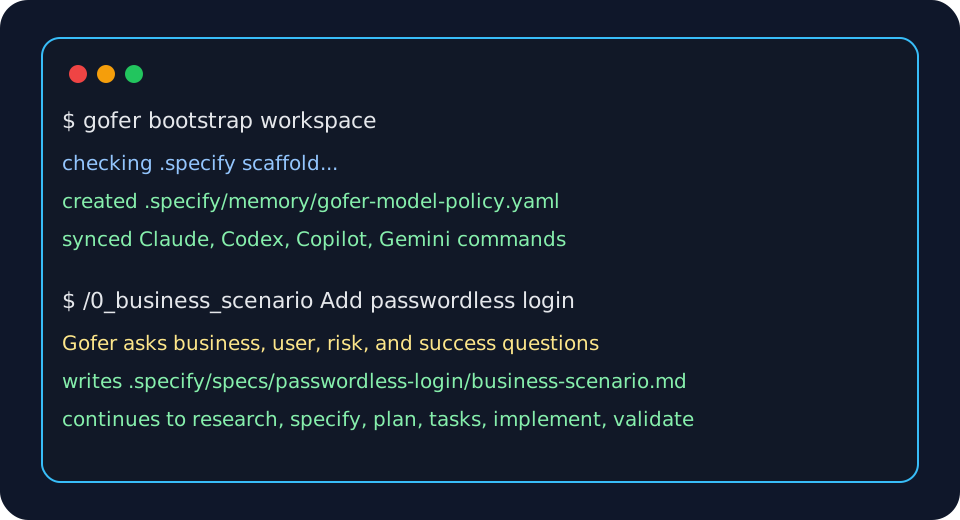
What Success Looks Like
After the first run, the repository should contain:
.specify/.gofer-version.specify/commands/0_business_scenario.md.specify/templates/spec-template.md.specify/memory/gofer-model-policy.yaml.specify/specs/{feature}/business-scenario.md
Gofer commands should also be available on the host you installed:
- Claude Code:
/0_business_scenario - Codex:
0_business_scenarioskill - GitHub Copilot:
#0_business_scenario - Gemini CLI:
/gofer:0_business_scenario - VS Code: Gofer: Initialize Repository and the Gofer panel
1. Install A Surface
VS Code
Install from the Marketplace when published, or use the public VSIX fallback:
curl -fsSL https://eai-tools.github.io/eai-gofer/releases/eai-gofer-latest.vsix \
  -o /tmp/eai-gofer-latest.vsix
code --install-extension /tmp/eai-gofer-latest.vsix
Claude Code
claude plugin marketplace add eai-tools/eai-gofer --scope user --sparse .claude-plugin --sparse plugins/eai-gofer
claude plugin install eai-gofer@eai-gofer --scope user
Codex
codex plugin marketplace add https://github.com/eai-tools/eai-gofer --sparse .agents/plugins --sparse plugins/eai-gofer
codex plugin add eai-gofer@eai-gofer
GitHub Copilot CLI
copilot plugin marketplace add https://github.com/eai-tools/eai-gofer
copilot plugin install eai-gofer@eai-gofer
Gemini CLI
gemini extensions install https://github.com/eai-tools/eai-gofer --auto-update
2. Initialize The Repository
For a first EAI Platform app, run:
/gofer:eai-first-run
That command checks Git, Node.js, npm, the scoped EAI registry, EAI CLI, login, tenant access, project folder, EAI app template readiness, and Gofer scaffold health before the first business scenario starts.
In VS Code, Gofer: Initialize Repository remains available when you only need the repo-owned Gofer scaffold.
In a CLI host, run the scaffold-only bootstrap helper when you are not creating an EAI Platform app:
/gofer:bootstrap-workspace
If a command detects a missing or stale scaffold, it should ask:
This repo is missing or stale for Gofer. Initialize/update it now?
Choose yes. Gofer should create or refresh .specify/, host command files, and
the model policy template.
If /0_business_scenario is unknown, install or update the Gofer plugin for the
host first, then run /gofer:eai-first-run. The first-run command is designed
to work before .specify/ exists.
3. Start The First Feature
Use the host-specific command syntax:
| Surface | Copy-paste first command |
|---|---|
| VS Code | Run Gofer: New Spec from Business Scenario or start /0_business_scenario from your connected assistant |
| Claude Code | /0_business_scenario I want to add passwordless login for customers |
| Codex | Use the 0_business_scenario skill: I want to add passwordless login for customers |
| GitHub Copilot | #0_business_scenario I want to add passwordless login for customers |
| Gemini CLI | /gofer:0_business_scenario I want to add passwordless login for customers |
For first EAI Platform app setup, start with /gofer:eai-first-run instead of
the stage command. It will hand you back to /0_business_scenario once the EAI
CLI, login, tenant, app template, and Gofer scaffold are ready.
Answer the questions Gofer asks about business value, users, constraints, success measures, risks, and known systems.
4. Confirm The First Artifact
The first successful command should write:
.specify/specs/{feature}/business-scenario.md
From there, continue the core pipeline:
/1_gofer_research
/2_gofer_specify
/3_gofer_plan
/4_gofer_tasks
/5_gofer_implement
/6_gofer_validate
/6_gofer_validate is the terminal quality gate and includes the engineering
review loop.
5. Where To Ask For Help
- Use Discussions for install help, workflow questions, examples, and roadmap ideas.
- Use Issues for confirmed bugs, scoped features, regressions, and packaging failures.
- Use the security policy for vulnerabilities or sensitive reports.